Automated Maneuvers
The upcoming chapter provides an overview of the automated maneuvers supported by the Reflex flight controller. Prior to configuration, it is essential to ensure that the Reflex is properly configured and finely tuned in Position Mode. The flight maneuvers listed here are utilized by the automated flight modes and so, configuration of these maneuvers will impact the performance of the flight modes.
Automated Trajectories
Automated trajectories in the Reflex are used throughout other automated maneuvers to achieve jerk-limited flight between various waypoints. The trajectory settings will ultimately influence flight behaviour in the following maneuvers:
- Takeoff maneuver
- Land maneuver
- Return To Launch maneuver (RTL)
In order to configure the autonomous trajectories settings, please navigate to the following location.
Web Interface: Settings > Commander > Trajectory
Acceptance Distance:
When flying autonomous trajectories, the trajectory planner will consider a given waypoint to be reached when the drone's position and yaw are within the thresholds defined under Acceptance Distance. Once all thresholds are satisfied, the trajectory planner will begin to issue setpoints toward the next waypoint or end the trajectory if the final waypoint has been reached.
Web Interface: Settings > Commander > Trajectory > Acceptance Distance
Here, the user may define thresholds in terms of horizontal and vertical position along with yaw.
Max Bounds:
When generating a trajectory between waypoints, the system will ensure that the state of the vehicle does not exceed defined velocity, acceleration, and jerk limits. These limits can be configured in the following location.
Web Interface: Settings > Commander > Trajectory > Max Bounds
Here, bounds can be set independently for the horizontal, vertical, and yaw motions.
Takeoff Maneuver:
To configure the Takeoff maneuver, set the takeoff altitude in the settings. This value is relative to the home location. When executing the maneuver, if the drone's altitude is below the takeoff altitude, it will ascend to the takeoff altitude using an automated trajectory, otherwise it will hold its present altitude.
Web Interface: Settings > Commander > Takeoff Mode
Land Maneuver
There are two types of configurable landing maneuvers for the Reflex: Constant Speed and Smooth Touchdown. The Constant Speed maneuver is enabled by default and as the name suggests, the drone will descend with a configurable landing speed until touchdown.
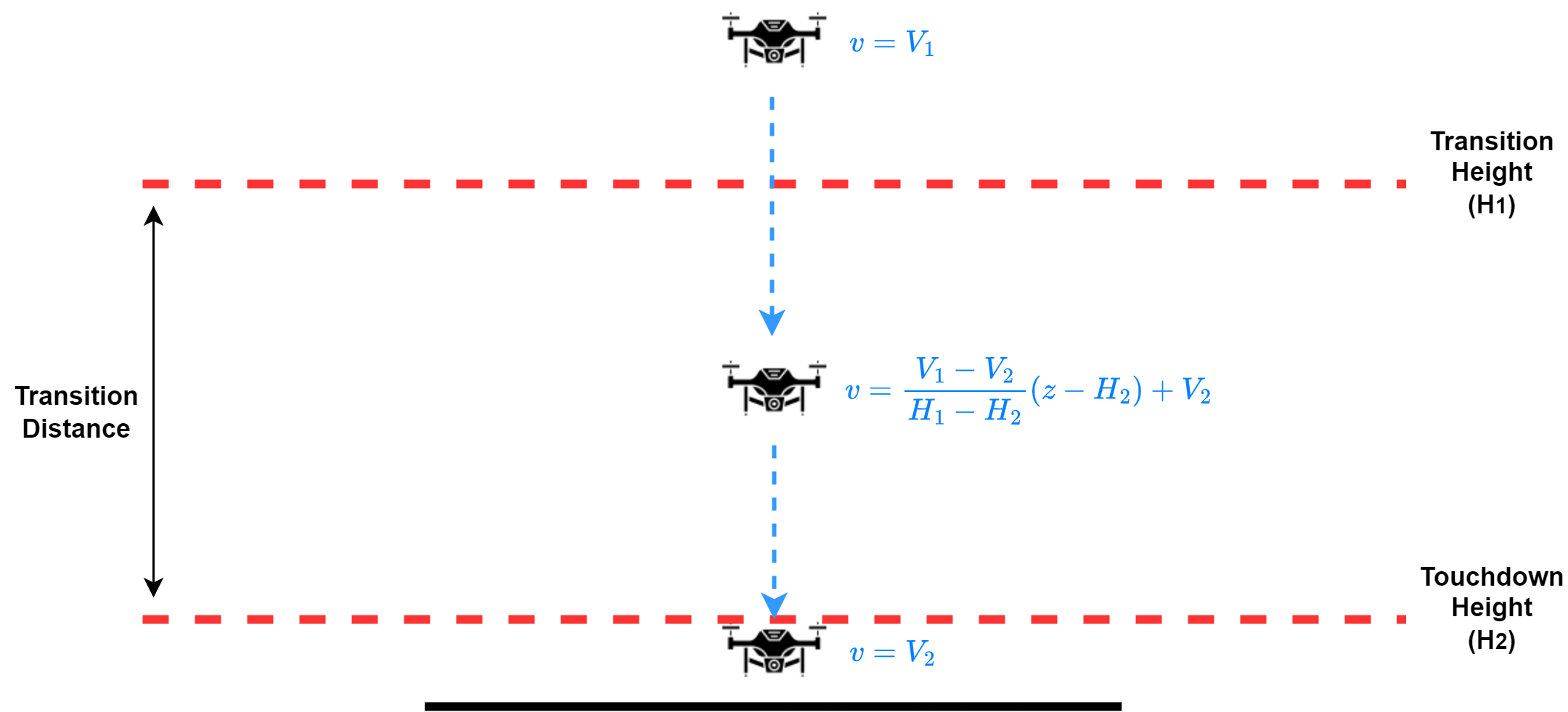
Alternatively, the Smooth Touchdown maneuver may be selected which will prompt for the configuration of a landing speed, touchdown speed, touchdown height, and transition distance. In this configuration, the drone will descend at the defined landing speed until it reaches a height above ground (referred to as the transition height) which is equal to the sum of the touchdown height and the transition distance. Once it reaches the transition height, the commanded velocity setpoints will be linearly interpolated between the landing speed and the touchdown speed, such that when the drone reaches the touchdown height, its downward velocity will be equal to the touchdown speed. A depiction of this maneuver can be seen in the image below.
Note: The Smooth Touchdown landing maneuver relies on a height above ground estimate. If a Lidar is not configured or if Lidar measurements are lost during operation, the landing maneuver will issue a constant downward velocity setpoint equal to the landing speed for the entirety of the maneuver.
In addition to the above settings, there is an option named Autonomous Descent to Land Altitude. If enabled, the user must set a safe landing altitude at which the drone will begin its landing maneuver. If the drone's altitude is greater than the defined landing altitude, then it will descend using an autonomous trajectory until it reaches this point, at which it will commence the landing maneuver. If the drone is already below this altitude or if the option is disabled in the settings, the landing maneuver will commence immediately regardless of the drone's altitude. It is advised that this landing altitude is set to a value which is guaranteed to be above all potential obstacles in order to avoid collision during the autonomous trajectory.
The land maneuver settings can be found at the following location in the web interface:
Web Interface: Settings > Commander > Land Mode
RTL Maneuver
The Return To Launch (RTL) maneuver is used to automatically return the vehicle to its home location. This is done by first executing an automated trajectory to a position directly over the home location, followed by the execution of a land maneuver. The following defines parameters of the RTL maneuver which influence the altitude and the path which it takes during the automated trajectory phase.
Return Altitude:
The Return Altitude is the altitude to which the drone will climb before navigating back to the home position. This altitude is relative to the home altitude and can be configured in the settings.
Web Interface: Settings > RTL Mode > Return Altitude
Return above maximum reached altitude:
Additionally, there is an option to enable the drone to return at the maximum reached altitude since arming, if it is higher than the configured Return Altitude. This safety feature guarantees that the drone never returns at an altitude lower than the highest point it reached during the flight.
Altitude Coning:
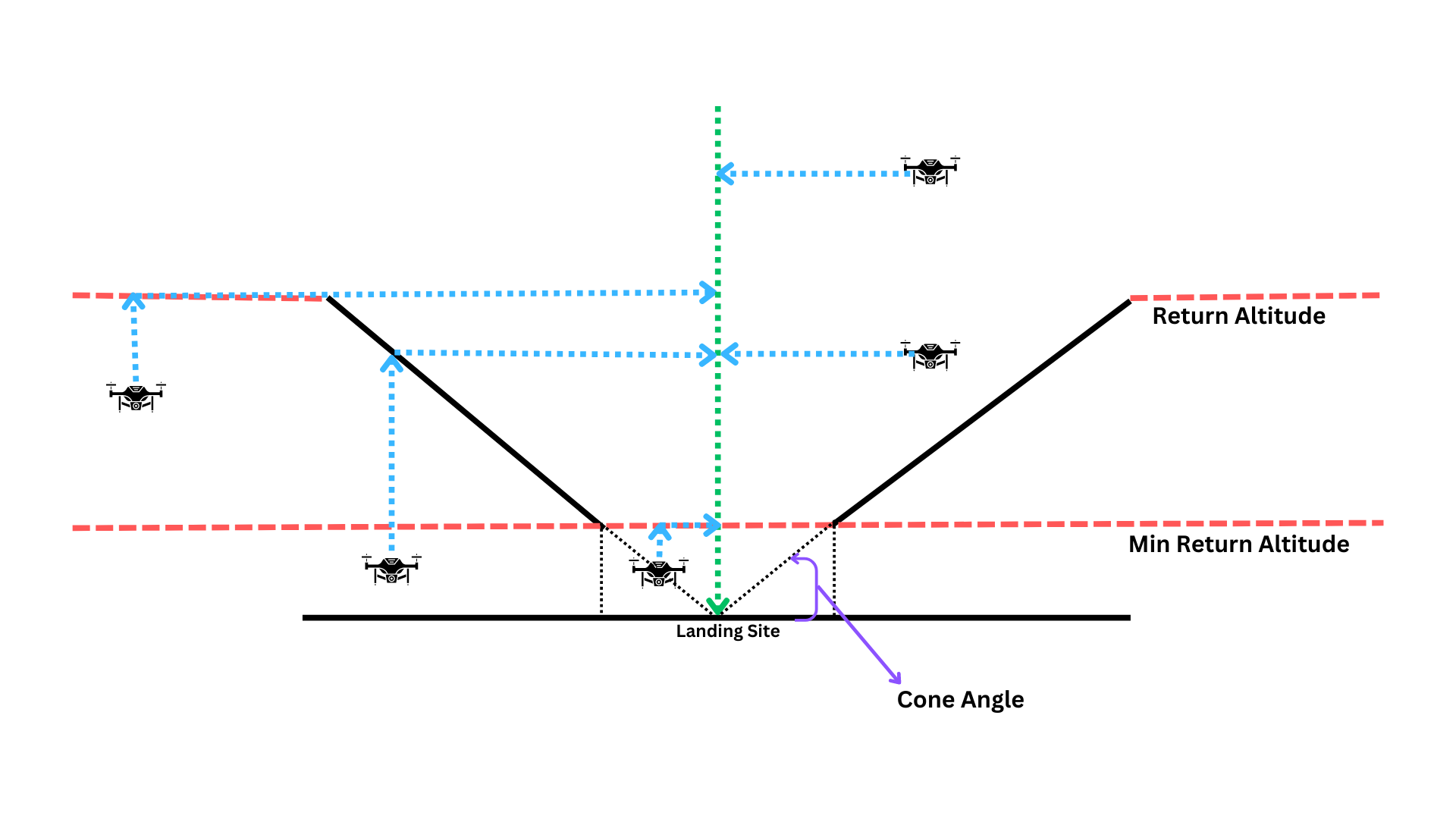
In scenarios where there is an open area around the landing site, the drone can be configured to perform the return flight at a lower altitude. This open area can be defined as a cone extending above the landing site.
If the cone feature is enabled, the return sequence follows these steps:
- If the drone is below the Min Return Altitude, it will climb upwards to reach the Min Return Altitude.
- The drone will then climb to reach the configured Return Altitude or climb to enter the cone, whichever altitude is lower.
- Once it reaches the desired altitude, the drone will fly horizontally at this level towards the landing site.
- Finally, the drone will execute a controlled landing.
This configuration is especially useful for the RTL (Return to Launch) mode, ensuring safe and efficient return operations for the drone.