Mounting The Reflex
While mounting the Reflex on a drone, its orientation and location upon installation must be configured. The following section details how to mount and properly configure the flight controller so that it functions correctly.
Mounting Orientation
The figure below shows the direction of the axes of the local coordinate system of the Reflex. The origin of the coordinate system is in the geometric centre of the Reflex.
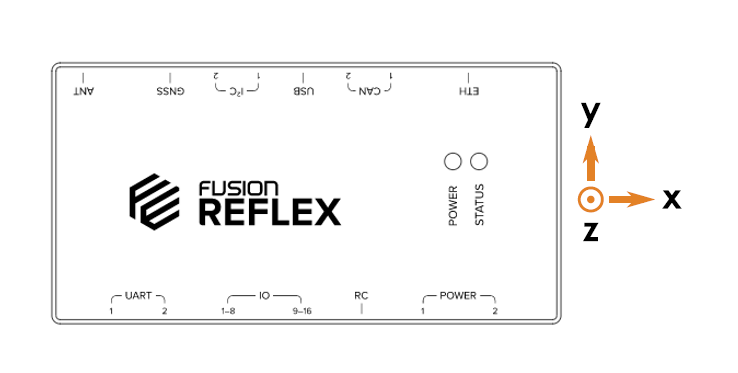
The mounting orientation as well as the location of the Reflex with respect to the centre of gravity of the drone can be configured on the web interface. This is done by navigating to the relevant sections of the Settings as given below.
Web Interface: Settings > Drone > Mounting Orientation
Web Interface: Settings > Drone > Controller Position
Under Mounting Orientation, the orientation of the controller's X and Y axes can be configured in relation to the orientation of the drone. Under Controller Position, the offset of the controller's center of gravity with respect to the drone's can be inputted in terms of the X, Y and Z axes.
Vibration Damping
The Reflex houses accelerometers and gyroscopes units (IMUs) which are sensitive to vibrations from the motors and other vibrations produced by a flying drone. If the experienced vibrations are too large, the Reflex's state estimation of the drone can become inaccurate, leading to issues with the dynamic controls. The goal of vibration damping is to reduce high frequency noise from the drone while allowing the lower frequency movements (the actual flight movement of the drone) to reach the accelerometers and gyroscopes.
The preferred method for physically damping the Reflex can be different depending on the frequency of the unwanted vibrations and the motor speeds. Different mounting solutions have different filtering properties. Commonly used mounting methods are:
- Vibration damping balls
- Foam tape
- Rubber standoffs
Alternatively, the Reflex may be hardmounted to the vehicle, however it is advised that the RPM Notch Filter is configured in order to filter out noise induced by the drone's motors.