Motor Test
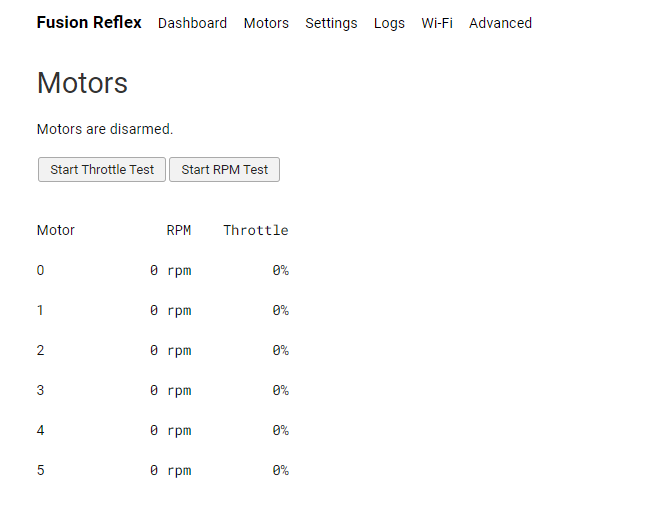
The motor test page in the web-interface allows the user to validate the proper functioning and spin direction of each of the motors. This page can be found in the navigation bar of the web-interface under Motors. The user can control the throttle or the rpm of the motors (if Bidirectional DShot is enabled and motor controller is configured)
For safety reasons, please make sure all propellers are removed prior to beginning the test.
Clicking the Start Throttle Test or Start RPM Test arms the motors for a manual motor test.
The motors can be controlled individually or all together via sliders. If Bidirectional DShot is enabled, the RPM is displayed as well. Check the image below for an overview of the motors tab in the web interface:
PWM ESC Calibration
In order to perform calibration of PWM ESCs, follow these steps:
- Remove the propellers.
- Disconnect the ESCs from the power source while keeping the Reflex powered on.
- Configure the minimum and maximum throttle to 0% and 100% in the settings below:
Web Interface: Settings > Drone > Motor Controller > Output Throttle Range
- Navigate to the Motor Test page and select Start Throttle Test.
- Set the throttle for all the ESCs to 100% by moving the slider all the way to the end.
- Power on the ESCs. They should enter calibration mode and continue to beep while recording the maximum throttle.
- Once the beeping stops, set the throttle for all the ESCs to 0% by moving the slider on the motor test page.
- The ESCs will beep and record the minimum throttle.
- Once this is done, the ESCs' calibration is complete.
Warning: Ensure that the propellers are removed before initiating the PWM calibration.
Note: During the calibration process, the motors should not be spinning. If a motor spins, please double-check that you have followed the instructions correctly.